
Short-term wins, long-term risks - The AI coding dilemma

Robbert van Kortenhof

Sam Samoud
Since the launch of GitHub's Co-Pilot in 2021, AI-assisted programming has come a long way, evolving from basic line completion to LLM-powered pair programming and architecture reasoning. After the initial excitement and trends like "vibe coding", a more thoughtful conversation started to emerge: how do these tools shape the way we solve problems? And just as importantly, how do they affect the quality of the solutions we create?
With time to reflect on their impact, this post takes a closer look at some of the most prominent and exciting AI programming tools out there. We’ll dive into research regarding their effects on coding efficiency, proficiency, quality and overall market impact, including their impact on consultancy. These points will converge when we examine the underlying trade-off between short-term gains and long-term maintainability. Towards the end, we explore some ways to manage this trade-off and share some considerations for the future of AI-assisted development.
Before we begin, one quick heads-up: this turned into quite a long read. If you’re looking for something specific, please use the table of contents below.
From line to codebase
- GitHub Copilot, Cursor, Cline
- Aider
- Code Graph Databases
From tools to impact
- Increased productivity
- Quality and consistency
- Onboarding and learning on steroids
- Lower barriers and vibing
The other side of the coin
- Reduced critical thinking and over reliance
- Low quality code and technical debt
- Maintainability and decreased code readability
- Imposter syndrome
Impact on the market
- Vulnerabilities at organizational level
- The concept of “maturity” in career trajectories
- Supply and demand in the job market
- Consultancy model shift
Controlling the short/long-term trade-off
- The 80/20 rule
- Re-determine the workflow
- Bootstrapping versus iteration
Looking ahead

From line to codebase
AI-assisted development tools come in many forms and shapes, each varying significantly in scope and functionality. Some can help you with a single line of code while others manage your entire codebase. They might seamlessly integrate into your favorite IDE or require adopting a new one entirely. Some prioritize best-practice suggestions, whereas others learn from you and your team’s workflow and adjust accordingly. There is the extent of automation, ranging from ad-hoc recommendations to fully automated task execution. And then we haven’t even touched upon what they actually do, which can be anything from generating tests or documentation, providing you with a capable, very eager pair-programming partner or taking over control completely and letting you “vibe” along.
There are countless resources available to explore the full range of possibilities. For now, let’s focus on a few prominent examples and personal favorites to see how they bring these dimensions to life.
GitHub Copilot, Cursor, Cline
In 2024’s StackOverflow Developer survey, 82% of the developers that use AI-assisted tools indicated do so to write code. It’s no surprise that, as of now, the most popular tools include GitHub Copilot, Cursor, Claude-dev/Cline and similar IDE options. The primary focus of these is to autocomplete whatever you’re working on. They extrapolate based on the code you are writing together with the context you’re operating in. The key word here is context. You can provide them access to your team’s codebase, documentation, Confluence pages, terminal logs, screenshots of the dashboard you’re building or specify use case-specific rules and constraints. The extent to which these tools can adequately consider your context when providing you with code suggestions is mixed, from seamlessly impressive to head-bashing frustrating.
Aider
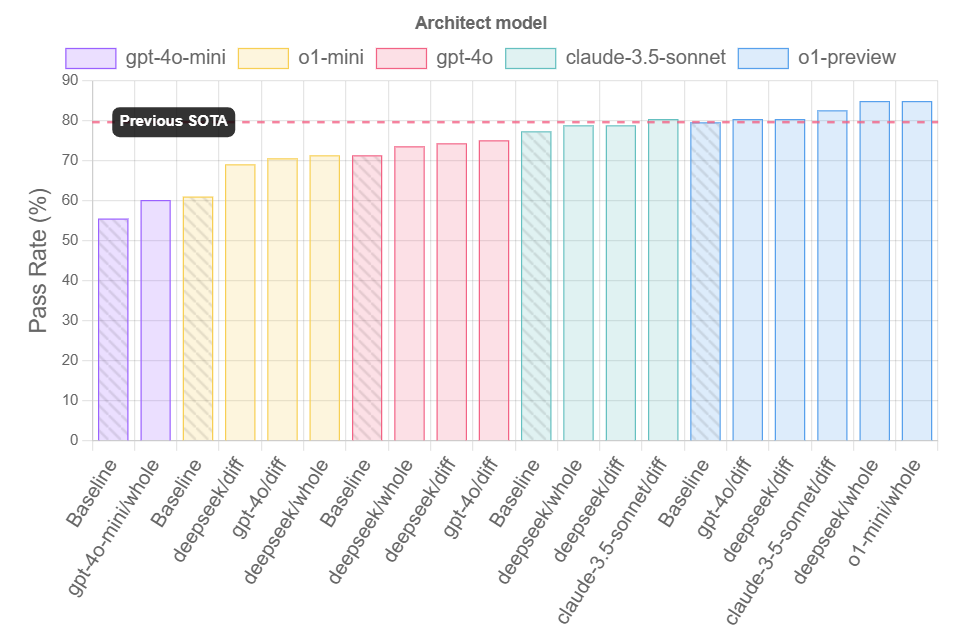
When OpenAI released the o1 models, it started to make sense to play to the strengths of different types of LLMs. An important consideration regarding these models is that they excel at reasoning tasks but sometimes struggle with code suggestions. That’s why Aider suggests splitting the general task of programming into two separate processes, that of reasoning and editing. One LLM has the role of “architect”, asked to describe how to solve a coding problem, while another would be the “editor”, producing specific coding suggestions or changes based on the architect’s description of the solution. This approach achieves higher scores than individually assigning each LLM to solve the benchmark exercises, making it an interesting LLM-powered pair-programming partner. Find the results for Aider’s programming benchmark below.
Code Graph Databases
An example of the wide variety of options available, not so much a tool as a technique: LLMs empowered by graph structures to operate on complex, intricate code repositories. LLMs can struggle with long-context inputs so naturally have some trouble with large codebases. Similarity-based retrieval methods, common in RAG systems, also have difficulty with complex reasoning. A promising take on this challenge is to support an LLM through the creation of a code graph database. In this graph, the nodes represent source code symbols such as modules, classes and functions accompanied by relevant metadata, whereas the edges between the nodes represent different possible relationships, such as contains, inherits and uses. This approach enables an LLM to perform flexible, complex tasks in a graph query language and perform multi-hop reasoning, thereby achieving more precise retrieval of information and effective scaling of tasks related to larger repositories. A step by step example is included below.
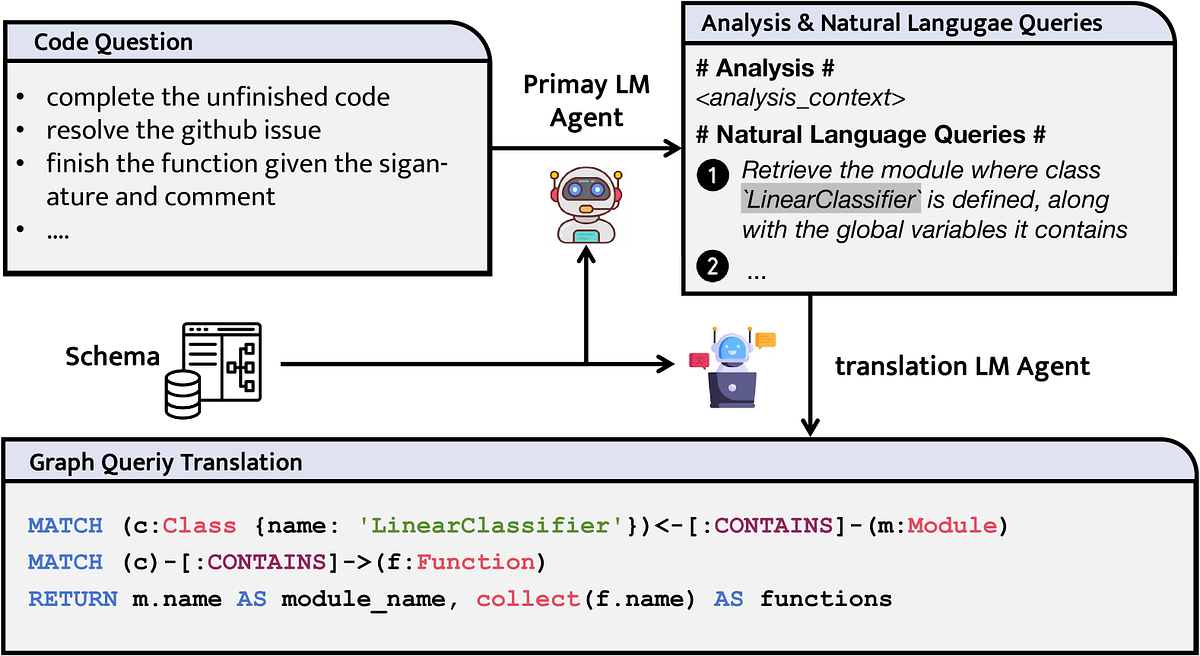
Liu, X., Lan, B., Hu, Z., Liu, Y., Zhang, Z., Wang, F., … & Zhou, W. (2024). Codexgraph: Bridging large language models and code repositories via code graph databases. arXiv preprint arXiv:2408.03910
From tools to impact
These tools are more than just novelties. They’re fundamentally changing how we write, manage, and reason about problems and the code to solve them. By offloading mechanical tasks and amplifying human capability, they shift the developer’s role from code writer to system designer. This transformation not only enhances the developer’s role but also brings tangible benefits, most notably in productivity, code quality and consistency, learning and accessibility.
Increased productivity
AI assisted development tools are accelerating development. This is highlighted by a study on developer productivity, stating that developers using GitHub Copilot completed tasks 55.8% faster than those without access to the tool. Especially interesting is the fact that developers with less experience, those coding more hours daily and older programmers saw the most significant improvements. By streamlining workflows and reducing manual effort, these AI tools facilitate quicker project delivery and shorter development cycles. Shortening the development timelines eventually translates to major reduction of development costs and definitely the required resources.
A specific process that would benefit major productivity gains is debugging. With the help of AI assisted development tools, the struggle of debugging long cryptic logs has become a bit more manageable. AI tools excel at static code analysis on the fly, flagging potential bugs, security vulnerabilities or logic errors before the code is executed. By catching these issues in real time, developers can fix problems immediately rather than spending hours tracing bugs after a failure. With the help of these tools, debugging changes fundamentally from a reactive to a proactive process. This in turn results in faster feedback cycles and fewer runtime surprises. In practice, an IDE like Cursor can pinpoint a problematic code section or suggest a fix, saving developers from lengthy manual troubleshooting.
Quality and consistency
Integrating AI into the coding process can improve code quality and consistency across a team’s projects. Intelligent assistants act as real time code reviewers, catching syntax errors, most common bugs and deviations from style guidelines before the code runs or is committed to a repository. These suggestions go beyond style guidelines and may include best practices improvements, such as simplifying complex loops or removing redundant code, to keep the codebase clean and maintainable.
By minimizing common human errors, AI tools help teams produce consistent coding standards across all contributors.
Onboarding and learning on steroid
A more indirect effect is that the adoption of AI assisted development lowers the ramp up time for junior developers and newcomers. These tools serve the role of on demand mentors, providing examples and explanations that help less experienced programmers learn best practices faster. You can point an AI to a code base and ask it to explain it to you like you were 10 and you will get the gist of it. So just like contributing to the code, these tools accelerate onboarding of new colleagues to projects or topics and boost confidence. A study by McKinsey shows that this effect depends on the complexity of the task at hand but that the programming skill gap between junior and senior developers is shrinking. This will lead to significant ripples in the job market.
Lower barriers and vibing
Perhaps one of the most profound impacts of AI assisted development is the lowered barrier to entry for creating programs. Generative AI tools and AI pair programmers enable even those with minimal coding experience to build first versions of functioning applications. In the past, you would need deep expertise in multiple programming languages and frameworks to develop a product, now, a motivated non-developer with just the right amount of curiosity can leverage AI to get the job done. Gone is the process of experimenting with initial demo projects just to learn the language in which you’re going to code. A vision and discipline will get you far, if not almost completely there, with an AI-assisted pipeline.

A new term was coined for this flow in February by none less than Andrej Karpathy, top tier AI legend and former AI director at Tesla, and has since then gone viral: vibe coding.
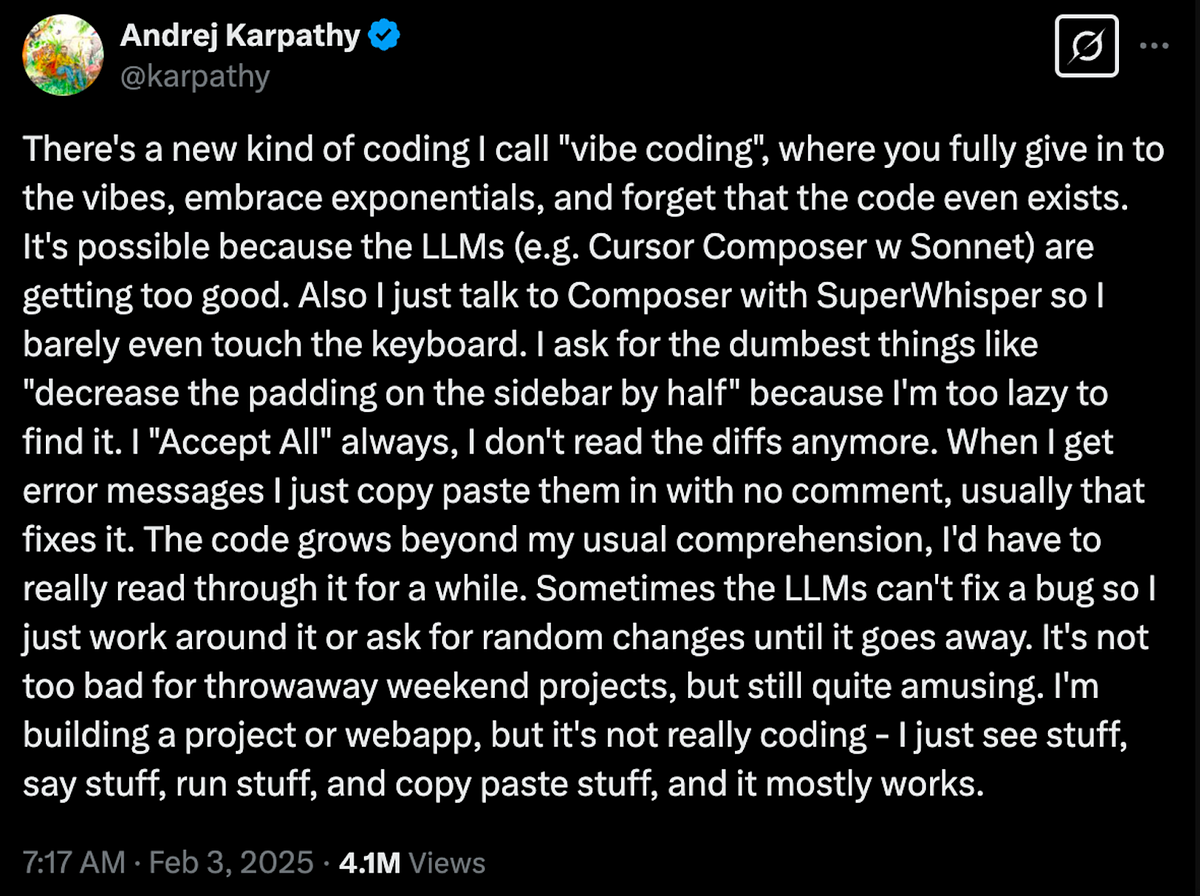
The tweet speaks for itself, though one should take of notice of the “It mostly works” in there. In this ongoing transition, code has become a “means” of communication to build something, not the goal nor the obstacle. You vibe with the flow of the AI suggestion, in natural language, as a guided conversation, and the results naturally follow.
The other side of the coin
Top tier names are obviously adopting these productivity hacks. However, what began as a simple hack evolved into a significant deviation. It sparked an entire paradigm shift, transforming the process of bringing ideas to life. This shift redefined our understanding of the software development ecosystem, rendering established methods “traditional”. Moreover, it is posing a challenge to certain business models reliant on cumulative knowledge. This is also growing into a dependency that can create a huge contrast based on whether this methodology is adopted or not. In the next chapter, this other side of the coin is explored, specifically regarding reduced critical thinking, technical debt and maintainability, imposter syndrome and the impact on the market, specifically the consultancy business model.
Reduced critical thinking & over reliance
AI code helpers can become a cognitive crutch. When developers lean too heavily on AI suggestions, they may forgo actively reasoning through problems. Over time, this over reliance erodes fundamental problem solving skills and reduces their ability to tackle coding challenges independently. Individually, a developer might struggle to explain or debug code that the AI produced, having missed the learning that comes from working through issues manually yourself. On a larger scale, teams risk a dip in overall engineering creativity and insight if members default to AI for every solution instead of brainstorming themselves. This brings us to the concept of learned helplessness, the decrease in critical thinking due to cognitive offloading to AI systems. Think about it, what would happen if you’re deep into this vibe coding flow when suddenly you reach your daily quota of your GPT like subscription? That can be a “let’s call it a day” moment for many minds that grew dull with this over reliance on AI-powered assistance.
Low quality code and technical debt
AI generated code is not guaranteed to be correct or optimal. These tools sometimes produce code that compiles but contains logic errors, inefficiencies or “hallucinated” segments that appear plausible yet are deeply flawed. Similarly, suggestions might use outdated algorithms and best practices or introduce known bugs. This mostly depends on what data the model was exposed to when training. Poor recommendations can lead to longer debugging sessions and technical debt if accepted uncritically. In an organizational context, unchecked low quality code can slip into production. At some moment, the previously discussed over reliance and, as a result, induced laziness will spill into the output checking reflex and a bug will slip through, to be detected afterwards when the stakes are intertwined with costly damages.
On a similar note on the relation to over reliance is the cognitive bias known as automation bias. This is the human tendency to favor suggestions from an automated system even when they may be incorrect. Developers might unconsciously give AI outputs more weight or scrutiny than they would if a human colleague provided the same code. This bias trickles down to the chance of mistakes being overlooked.
Maintainability and decreased code readability
Have you already had the pleasure of reviewing a pull request from a junior developer who created code with an AI assisted workflow? It’s a 4D chess game to assess the sanity of the code and its potential vulnerability versus the skills of the contributors and their technical growth.
Key giveaways are over-engineered functions and the extensive, verbose comments for the simplest things. While AI generated code might solve a task, it doesn’t always do so in a clean, human friendly way.
It became apparent through numerous studies that AI suggestions can be overly verbose or use unconventional structures, making the codebase harder to read and maintain. Cyclomatic complexity is a software metric that quantifies the number of linearly independent paths through a program’s source code, effectively measuring its structural complexity. Higher cyclomatic complexity indicates more decision points, making the code harder to understand, test and maintain. The paper Comparing Human and LLM Generated Code: The Jury is Still Out! details a comparison on this metric of code produced by humans and GPT-4, revealing that GPT-4 tends to generate code with significantly higher complexity. This increased complexity naturally impacts maintainability by making the code more difficult to comprehend and more prone to errors. For an individual developer, accepting such code means that future edits or debugging will become more challenging. For teams, this can accumulate as technical debt. The code that meets the immediate need becomes difficult to extend, test, or modify, ultimately slowing down development as the codebase grows.
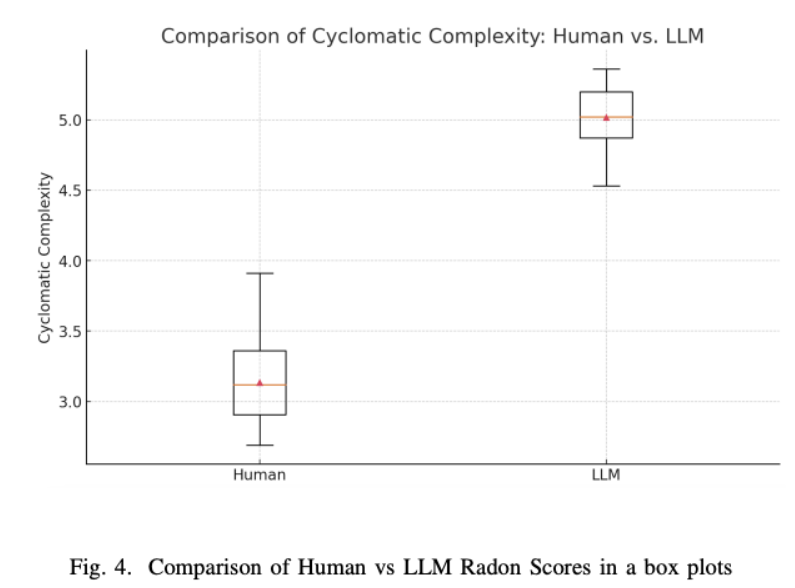
Licorish, S. A., Bajpai, A., Arora, C., Wang, F., & Tantithamthavorn, K. (2025). Comparing Human and LLM Generated Code: The Jury is Still Out!. arXiv preprint arXiv:2501.16857
Imposter syndrome
Next to technical implications, the psychological impact on engineers and developers using AI tools is worth mentioning. For some, relying on AI to solve problems can trigger or exacerbate imposter syndrome, the feeling that one is not a “real” developer and will be exposed as a fraud.
When an AI writes significant portions of code, a programmer might feel as if the success isn’t truly theirs, leading to self doubt of their own abilities. Ironically, a tool meant to help can make a developer question if they could have come up with the solution on their own.
There’s also the fear of “Will I be replaced if I can only do what the AI tells me?”. That question hangs over many minds. Developers have reported that they feel like they’re cheating by using Copilot or similar assistants, since the AI handles parts, if not most, of the work for them.
This feeling only gets worse when the over reliance grows as well, making it difficult to snap out of that vicious loop. Rabobank shared a good post a while back on how to recognize that feeling and embrace it. Nevertheless, a combination of doubt and inability to take back control makes for a dangerous combination.
Impact on the market
The impact of AI-assisted development tools trickles down from individuals to teams, from teams to organizations and, eventually, from organizations to the market at large. This impact is multi-faceted, changing both recruitment strategies and the consultancy model. Along the way, it also raises new challenges around security, data privacy and IP protection. This is especially relevant within large organizations where proprietary systems and sensitive information are deeply embedded in development workflows.
Vulnerabilities at organizational level
First, the vulnerabilities at an organizational level. Beyond the earlier discussed concerns regarding code quality and maintainability, AI coding assistants raise privacy and intellectual property concerns that are not always obvious to users. The code you prompt an AI with or the snippets it generates could expose sensitive information. In fact, researchers have found instances where an AI suggestion contained API keys or credentials, presumably from its training data. This means that, other than key leakages, if an organization’s proprietary code somehow was presented during the AI’s training, similar patterns might leak out to other users and systems.
This brings IP protection and security to the forefront, particularly when interacting with a cloud-based LLM. Can you be certain that your session data is deleted afterward and not retained for fine-tuning or training purposes? If your team members use these tools, do you have guidelines on what form of interactions or data you can share with these systems? Do you own the risk of passing logs to be debugged that might initially seem innocent but, with a triangulation over multiple sessions, enable someone to draw an entire overview of your project’s topology and infrastructure networking?
A local airtight substitute system is an option, in which you own the end to end throughput of an open source model. However, significant efforts need to be done for similar “regulations” in an organizational context, such as providing the infrastructure and imposing security measures, in particular validating open-source LLMs for malicious executables and prompting.
The concept of “maturity” in career trajectories
The traditional path from junior to senior developer involves solving a lot of problems, making as many mistakes and learning from them and those around you. AI assistance could and already is disrupting this process by instantly resolving challenges, allowing juniors to take on larger tasks without fully developing their problem solving and communication skills. And while AI may boost short term productivity, the risk is to create mid-level engineers who lack a deep understanding of the problems they are trying to solve, struggle with architecture design and debugging and lack the required communication skills to share their solutions effectively. In essence, speeding up coding tasks with AI can come at the cost of “diminished learning opportunities,” which can have long lasting effects on a developer’s skill set. Another effect is that the entry bar to junior positions gets higher and more selective. This creates a bottleneck for the output of traditional learning institutions. These tools also put pressure on mid-level engineers, who find themselves caught between the slow, organic process of learning through experience and the instant gratification of quick, AI-generated solutions.
Supply and demand in the job market
AI-assisted development is reshaping software engineering roles and demand. On one hand, these tools can handle a lot of routine coding tasks, which may reduce the need for entry level developers who typically start their careers doing simpler programming work. Companies might hire fewer junior engineers or expect new hires to be proficient in using AI tools. This effectively raises the skill bar for getting a job. At the same time, the rise of AI is increasing demand for specialists who can build, maintain, and integrate these AI systems, such as AI engineers or platform engineers.
For individual developers, this means the career landscape is shifting. Programmers must continually upskill to stay relevant, learning new LLM-related tools and keeping up with most recent developments, or specialize into a field that has not been affected (as much) by AI yet, such as higher level system design and governance. Industry wide, we may see a stratification of roles, with fewer positions focused on programming and more emphasis on roles that require creative, architectural or AI-monitoring skills.
Consultancy model shift
Historically, software consultants played a critical role in organizations by bringing outside expertise that in-house teams lacked. As a result of working across many projects and companies, consultants could rely on extensive experience and broad exposure to what works and what doesn’t, injecting best practices and innovative ideas that internal developers hadn’t seen before. In essence, consultants filled skill gaps and provided seasoned guidance, acting as temporary high-skilled team members who could ramp up quickly.
One must notice the past tense way of writing in the previous section. The AI-assisted workflow now bridges, to a certain extent, that knowledge gap between the internal teams and the value proposition of a traditional consultancy firm through the many points mentioned earlier.
This eventually leads to three main outcomes:
- Internal teams are able to handle more hands-on topics with the AI-assisted gains in productivity.
- The hiring of consultancy agencies becomes more selective due to the new capacities of the internal teams, especially regarding easier implementation of best practices, generating boiler plate code and operationalizing technological developments.
- Finally, a shift in the value proposition of consultancy firms, where consultants increase their focus on strategic guidance and complex problem solving.
So as Cursor or a GPT-like system automates more of the labor intensive work in software projects, consultancies are going to be pushed to evolve their service model. Rather than selling large teams of developers to implement a solution, consulting firms will need to pivot to offering more leadership, strategic guidance and enablement. In practical terms, consultants will spend less time manually producing code or grinding through analysis and more time supervising AI-driven development and ensuring its success. They might act as “orchestrators” to set up the right tooling, validating the outputs of (AI) systems and aligning those outputs with business objectives.
Andrei Croitor created a mental model of this transition, illustrating how the consultant’s role is shifting toward interpreting and steering AI’s work, as if the future consultant will be “a curator of intelligence,” leveraging AI’s data processing power but providing the human context and direction it lacks.
Controlling the short/long-term trade-off
So far, we have established how AI assisted development tools can accelerate your workflow, be it in productivity or accessibility, and how these benefits can come at a price in the long term. This trade-off between short term gains and long term risks and costs should be actively navigated on multiple fronts and both on an individual developer-basis as together in teams. Next, we will explore some ways of thinking regarding this issue.
The 80/20 rule
One approach to the trade-off that has been making the rounds is the 80/20 rule. This way of working consists of using AI tools for a minority of the tasks, whereas the majority would consist of human-driven development. The proposed 80/20 proportions are a rough suggestion and would ideally be a team supported guideline instead of a harsh rule enforced on individual developers.
The goal of limiting the proportion of work done with the help of AI tools is that you reap the benefits on the short-term without exposing yourself to the long-term risks. To incorporate this way of working in an organic way, one could think of hosting AI-free coding sessions done by a team to refresh problem solving skills or a required human in the loop of pull request reviews.
Re-determine the workflow
Once a team is at the point where it has agreed on constraining the use of AI tools, it begs the question: when do you use it?
To start at the other side, when you maybe shouldn’t, is any development related to core business logic. Solutions that are either too critical or too context specific for AI to have any meaningful impact, regardless of their ability to consider (business) context. A similar point can be made for code that covers important edge cases. Another place where AI should probably be limited is the process of reviews. Reviews are first and foremost for critical thinking and covering possible issues. Secondly, they are an important tool for communicating your progress in solving a problem and inviting others to join the conversation in a meaningful way. Leaving this part to the 20% would lead into the maintainability problem.
AI tools excel at problems that have as little ambiguity and need for creativity as possible: boilerplate code, generic workflows, writing documentation, possibly writing some tests. These tasks can easily be automated, resulting in efficiency gains and freeing up time for more meaningful tasks described in the previous section.
Bootstrapping versus iteration
When focusing a little more on the 20%, regardless of what you’re spending that AI-supported part of your work on, it’s important to reflect on how you’re using these tools. There are generally speaking two styles: bootstrapping and iteration.
Bootstrapping refers to the process of setting up entire parts of the solution through AI tools in no time. Starting with a rough idea of how the solution should work or, arguably worse, only with a description of the problem and copy pasting the code suggestions to get the final solution. This method proved to be extremely effective in throwing together proof of concepts and demos in a matter of hours instead of days. On a similar note, this approach also comes with some long-term risks, particularly concerning technical debt, maintainability and over reliance.
The alternative is to take a more iterative approach: bringing the tools into your workflow as if they are pair programmers, introducing a more thorough back and forth. Specifying the specific chunks of code that could use some refactoring, asking it to cover edge cases the current code might be missing, making it challenge your architectural decisions. In this dynamic, the developer takes a more engaged role, constantly reflecting on and validating the suggestions before accepting parts of the solution, possibly reiterating through the same tools. This comes at the price of making less progress in the short term but puts safeguards on long-term risks.
The point here is not to say one is better than the other — both ways of using AI tools serve different goals. Instead, it’s about being aware of how you are using these tools and understanding the risks that come with them.
Looking ahead
In this blog post we have covered some specific examples of AI-assisted development tools, the way they can accelerate development in the short-term and how they might expose developers, teams and organisations to considerable risks in the long-term. Finally, we proposed a way of thinking about these tools that might help you navigate this trade-off.
This only covers what we know so far. These tools are progressing at a neck-breaking pace and research is still being done on the more detailed effects of using them. Not only on immediate efficiency and productivity gains but more holistically as well: how does it affect the way we think about and solve problems? How does it change our way of communicating about these challenges and subsequent solutions, both in teams as well as across organisations?
A mistake one should not make is to assume the future of these tools is only a linear continuation of what they are capable of today. Put differently, one should assume that both these tools and how we interact with them is still subject to fundamental shifts. One prominent direction we should consider is that of agentic AI and how this might significantly improve these tools and their problem solving capabilities for multi-step, complex and context-specific challenges.
As discussed at length, the introduction and now mastering of these tools bring with them a shift in the paradigm. We must navigate this shift thoughtfully and we should constantly reflect on how these tools dull critical thinking and reshape how we solve problems. To put it more bluntly, think of AI as an autopilot for coding: it can handle a lot on its own but no responsible pilot ever leaves the cockpit. We will have to be on board with these AI “co-pilots”, letting them accelerate and elevate our work but without ever giving up full control or skepticism.